
Claude SDKs Now Include Computer Use and Browser Use Toolsets, So You No Longer Write the Loop
The Claude Python and TypeScript SDKs now include computer use and browser use toolsets in beta. The SDK runs the loop, your policies, and your approval callback. You write only the driver for your own browser or desktop, or use one from partners such as Browser Use, Browserbase, E2B, and Daytona.
By Nattapon YongpaiboonCo-founder, Claude Thailand Community
The Claude SDKs for Python and TypeScript now have computer use and browser use toolsets built in. Both are in beta.
This matters to anyone building agents where Claude controls a browser or a computer, because the most tedious and error-prone part of that work has moved into the SDK. As the ClaudeDevs account put it, the API tells you what Claude wants to click or type. Previously you had to write your own loop and map clicks and keystrokes to commands. Now the SDKs run the loop and send actions to drivers.
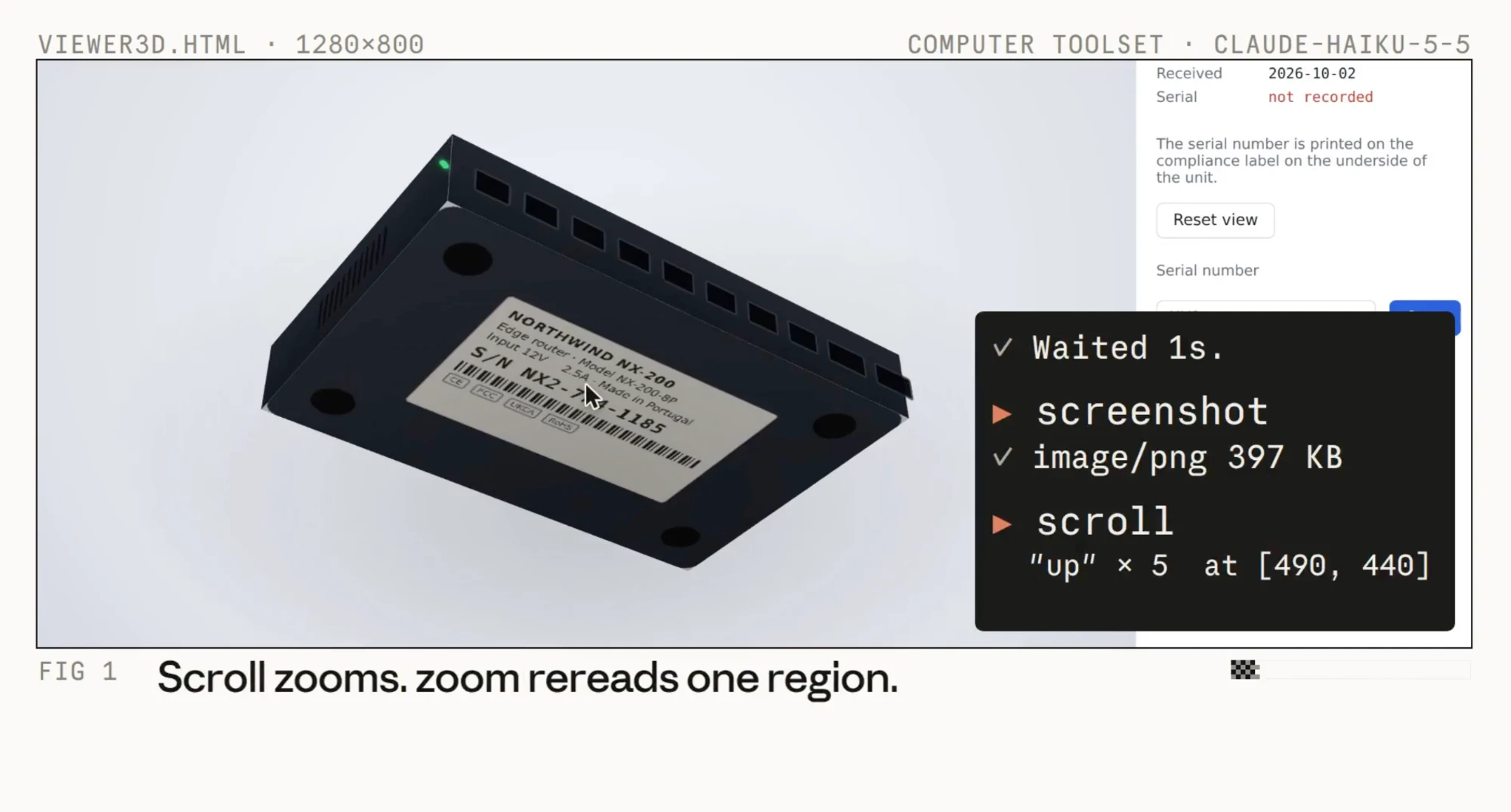
The image above is from the demo video. Claude Haiku 5.5 uses the computer toolset on a web page that shows a 3D model of a router. The page says the serial number has not been recorded and that it is printed on the label under the unit. The black box shows what Claude does step by step: it waits, takes a screenshot, then scrolls to zoom in and read the label.
Who does what
Claude does not click anything itself. It looks at a screenshot and replies with what it wants to do, such as clicking at these coordinates or typing this text. Your code has to carry out the action and send the result back for Claude to look at, and that repeats until the task is done.
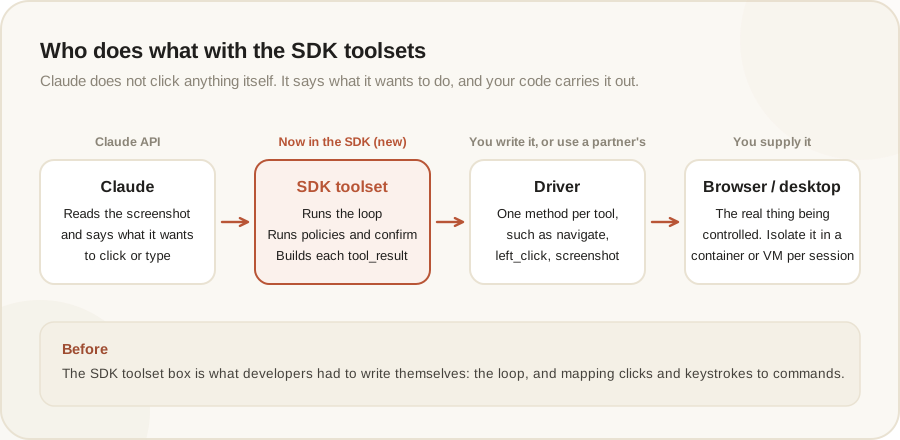
| Part | Who owns it | What it does |
|---|---|---|
| SDK toolset | The SDK | Routes each call to the right method, runs the policies you pass, asks your approval callback, and builds each tool_result |
| Driver | You, or a partner | A subclass of the toolset with one method per tool, such as navigate or left_click, written against your own browser or desktop automation |
| Browser or desktop | You | The real thing being controlled |
The docs are explicit: the SDK doesn’t include a browser, a desktop, a ready-made driver, or a URL policy. Those are yours to provide.
If you don’t want to write a driver
There are two routes:
- Use a partner’s driver. Four partners publish their own integrations with the SDK toolsets: Browser Use, Browserbase, Daytona, and E2B
- Start from Anthropic’s example. The
claude-quickstartsrepository has a minimal example driver in Python and TypeScript that controls Chromium through the Chrome DevTools Protocol. The docs warn that it isn’t production code
Once you have a driver, calling it is short. This example is condensed from the docs, where MyBrowser is your driver:
with MyBrowser(backend, url_policy=url_policy) as browser:
    runner = client.beta.messages.tool_runner(
        model="claude-opus-5-5",
        max_tokens=1024,
        tools=[browser],
        messages=[{"role": "user", "content": "Open example.com and tell me the page heading."}],
    )
    for message in runner:
        print(message)
You pass the driver itself in tools, and the tool runner runs the loop until the task ends. If you prefer to control the loop, you can answer each call with the toolset’s tool_result instead.
The browser toolset
- The main class is
BetaAbstractBrowserToolset20260801 - You implement only the members your browser supports, such as
navigate,screenshot,left_click,read_page, orget_page_text. A member you don’t implement is sent to the API as disabled - Every driver has to report browser state: the open tabs and what changed. The SDK calls this after every call
javascript_execandfile_uploadare off by default. Enabling either one requires aconfirmcallable for approval, or the constructor raises a configuration error- There is an early start option that lets a call start while Claude’s response is still streaming, by passing
stream=Trueandrun_tools_eagerly=True
The computer toolset
- The main class is
BetaAbstractComputerToolset20260801, for the computer use tool and its 17 tools - Every tool you implement is on by default, unlike the browser toolset
- If your driver implements
type,key, orhold_key, you must pass aconfirmcallable or turn those tools off, or the constructor raises an error - The points Claude sends are pixel positions in the screenshots you return. If your screenshots are a different size from the display, your driver has to convert in both directions
- The SDK never reads or resizes an image. The API rejects an image over the model’s limits, which ends the run, so scale images in the driver
You can use both toolsets in one request by passing both in tools. The SDK sends each call to the matching toolset.
Security is the part to read to the end
The docs give this more space than anything else. The reason: Claude’s next action depends on the pages it reads. A page, or text injected into one, can try to make Claude reach internal services, pull files off the host, or trigger actions with real effects.
For the browser toolset, the docs list six steps to take before running a driver against anything but a throwaway browser:
- Write a URL policy that refuses every URL the task doesn’t need. Without a policy, the SDK checks no URL at all
- Intercept requests in the driver and check them with the same rules, because the URL policy sees only
navigatecalls, not links Claude clicks or redirects - Put egress rules on the container to block private networks and the cloud metadata address
- Confine uploads and downloads, or leave uploads off
- Gate consequential members with
confirm - Isolate the browser in a dedicated container or VM for each session
The SDK applies steps 1, 4, and 5 through the policies and callable you pass. Steps 2, 3, and 6 are up to your driver and your deployment.
Points worth remembering:
- The browser profile must not be signed in to any account whose data or actions you wouldn’t hand to Claude
- Purchases, sent messages, and accepted terms happen through ordinary calls such as
left_clickandtype, soconfirmcannot pick them out by name. If you want a person to approve them, ask about those calls too - On a desktop, keep terminals and launchers closed unless the task needs one, because whatever Claude types there gets run
- Treat everything a page or screen returns as untrusted, including window titles, tab titles, and clipboard text
- Anthropic’s prompt-injection classifiers don’t currently run on browser toolset requests sent through Amazon Bedrock
How this connects to earlier news
These toolsets were announced alongside Claude Haiku 5.5, which Anthropic says is especially well suited to computer use and browser use because of its speed and low price. The two tools themselves were already generally available, as we covered in our Computer use and Browser tool article. What is new here is the SDK layer that wraps them.
The author’s take
For me this lowers the barrier to building a browser agent considerably. The part people usually get stuck on is the loop and the action mapping, code that everyone writes again and gets wrong in the same places. With the SDK taking that over, and partner drivers available, it is much quicker to get started.
What the SDK does not give you is the security of a real system. The docs say it plainly: if you write no URL policy, nothing checks URLs for you, and the example in the docs is not a production policy. If you plan to use this for real work, especially where the browser is signed in to an account, read the security sections in full first and start with an empty browser in an isolated container.
If you wire these toolsets into your own work, share how it went with the group.
The information in this article is based on the Claude Platform docs and a post from the ClaudeDevs account on X. The feature is in beta and details may change. Read the original source in the link below.
Get it by email
New articles, Claude updates and community event announcements. Sent occasionally, never often enough to annoy you.
The newsletter is written in Thai