
Claude Now Works in Google Docs, Sheets, and Slides, in Beta on All Paid Plans
Anthropic has released Claude for Google Workspace in public beta on all paid plans. Claude opens in a sidebar in Docs, Sheets, and Slides, reads the file you have open, and edits it in place with your approval. New connectors also let Claude create and edit Google files from the chat.
By Nattapon YongpaiboonCo-founder, Claude Thailand Community
Claude now works in Google Docs, Sheets, and Slides. Anthropic has released Claude for Google Workspace in public beta on all paid plans, and it comes in two parts:
- An add-on that opens Claude in a sidebar inside the Google file you are working on
- Google Docs, Sheets, and Slides connectors (beta) that let Claude create and edit Google files from the Claude chat itself
You can start from the Google side or the Claude side, without switching between apps or tabs.
Claude sits in a sidebar next to your file
Once the add-on is installed, Claude opens in a sidebar beside the file. It can read the file you have open, see which text, cells, or slides you have selected, and make changes directly in the file.
In Docs
- Fix a sentence or restyle a heading in place, without touching the surrounding formatting
- For bigger rewrites, Claude proposes edits as suggestion cards in the sidebar. Each card highlights the passage it would change, and you apply or dismiss it
- Anthropic’s example: ask Claude to tighten the executive summary of a product requirements document and turn the next steps into a table, and it does both in the doc
In Sheets
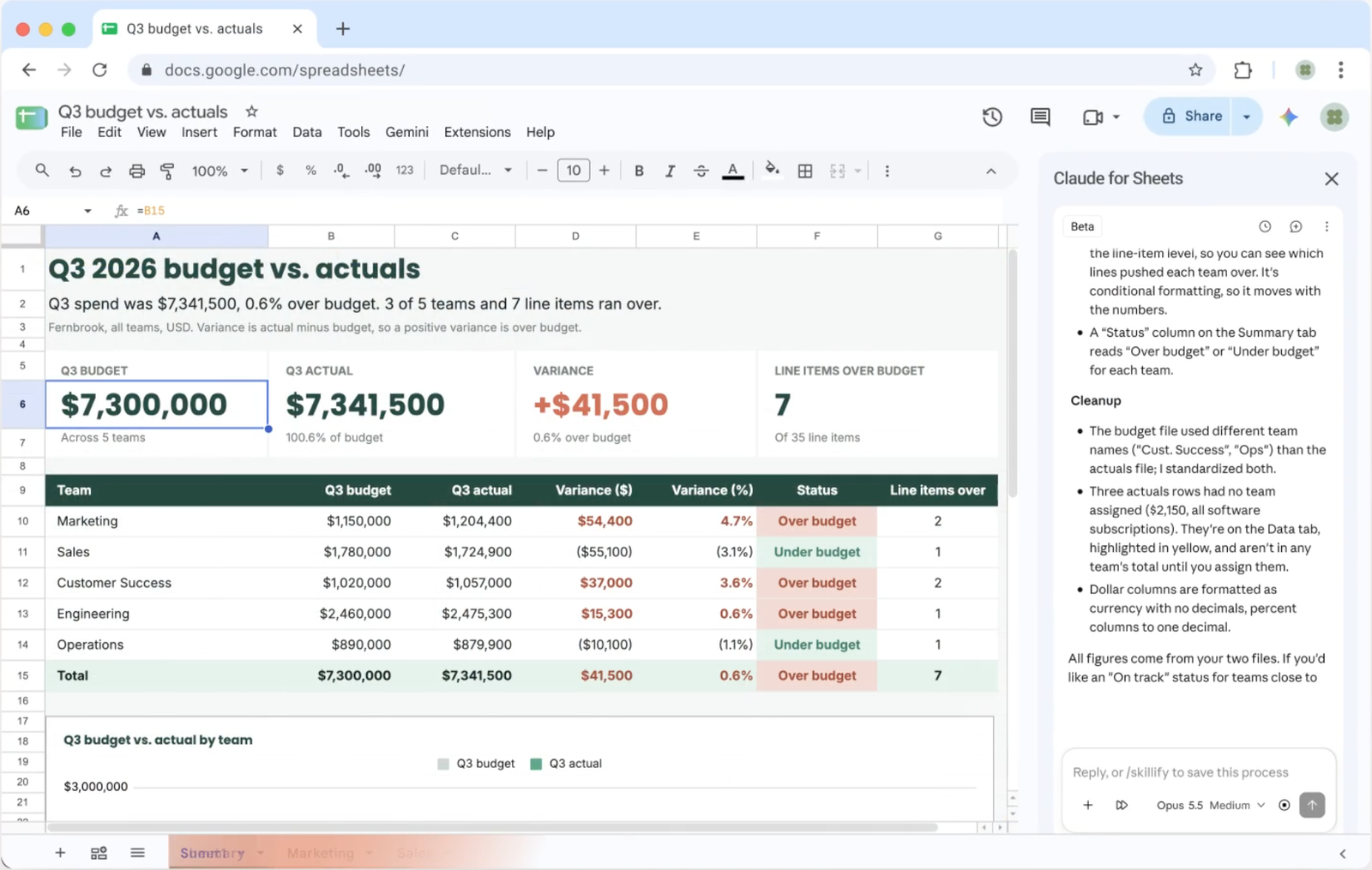
- Write formulas, build pivot tables and native Sheets charts, and add new tabs
- For joins or data cleaning, Claude can pull a range into Python and write the results back into the sheet
- Anthropic’s example: start from an empty sheet, attach your source files, and ask for a Q3 budget vs. actuals report with a tab for each team and a summary chart. Claude can flag anything over budget
In Slides
- Build new slides from your deck’s layouts and themes, so they match the rest of the deck
- Check its own work and flag elements that overlap or run off the slide, or text that is hard to read
You decide how much Claude does on its own
There are two modes:
| Mode | What Claude does |
|---|---|
| Ask before edits (default) | Each change appears as an approval card with a summary, and Claude waits for your approval before editing |
| Accept all edits | Claude works through the task and applies changes without stopping |
Your connectors, skills, and enterprise controls come with you
When you are signed in with your Claude account, the sidebar has the same models, connectors, and skills you use in Claude.
Anthropic’s example: ask for a quarterly business review (QBR) deck for a customer, and Claude can pull the account history from Salesforce and recent call notes through your Google Drive connector. Save the QBR format as a skill, and your team can build the next deck following the same format and steps.
On Enterprise plans, controls such as the Compliance API, customer-managed encryption keys (CMEK), and OpenTelemetry audit export apply to the add-on too.
Edit Google files from the Claude chat
The other route starts on the Claude side, with the Google Docs, Sheets, and Slides connectors, which are also in beta.
- Paste a Google file link, or ask for a new doc, sheet, or deck in the chat
- On supported setups, the file opens in a pane beside the conversation for you and Claude to edit together
- Claude’s access matches your existing Google sharing permissions. If you cannot open a file, neither can Claude
Anthropic says starting from Claude makes the most sense when you need a new file or your work spans several files.
| Add-on in Google | Connectors in Claude | |
|---|---|---|
| Where you start | The file open in Docs, Sheets, or Slides | The Claude chat |
| Best for | Work inside the one file you are in | New files, or work that spans several files |
| How to turn it on | Install from the Google Workspace Marketplace | Turn on the connectors in Claude |
Getting started
Add-on
- Install Claude for Google Workspace from the Google Workspace Marketplace
- Open a file and go to Extensions > Claude > Open Claude
- For organizations, admins can deploy it to their domain or to selected groups from the Google Admin console
Connectors
- Turn on the Google Docs, Sheets, and Slides connectors in Claude
- On Team and Enterprise plans, an owner or primary owner needs to enable the connectors first
Both are in beta and available on all paid plans. The free plan is not part of this announcement.
The author’s take
I think this matters more for Thai users than it first appears, because so many teams here already run on Google Workspace. There is no more copying content back and forth between Claude and a Google file, because Claude sits inside the file, and it brings the connectors and skills you have already set up.
What I like is that the default is Ask before edits, so every change passes in front of you first. That suits real work documents where a wrong edit has a cost. Keep in mind that everything is still in beta, and that any numbers Claude summarizes in Sheets should be checked against the source data before you pass them on.
If you try it on documents, budgets, or slides, share how it went with the group.
The information in this article is based on Anthropic’s official announcement at claude.com and posts from the Claude account on X. Read the original source in the link below.
Get it by email
New articles, Claude updates and community event announcements. Sent occasionally, never often enough to annoy you.
The newsletter is written in Thai