
Claude Launches Dashboards and Motion in Beta, and Docs, Slides, and Design Come to Every Plan Including Free
Claude Dashboards turns company data into a dashboard that stays current. Claude Motion turns reports and charts into short animations you can export as MP4. Both are in beta. Claude Docs, Slides, and Design are now out of beta and available on every plan, including Free.
By Nattapon YongpaiboonCo-founder, Claude Thailand Community
Anthropic has launched two new Claude capabilities in beta, Claude Dashboards and Claude Motion, and announced that Claude Docs, Slides, and Design are out of beta and available on every plan, including Free.
- Dashboards turns your company’s data into a dashboard that stays current
- Motion turns a report, chart, or product walkthrough into a short animation for presenting
| Feature | Status | Available on |
|---|---|---|
| Claude Dashboards | Beta | Paid plans |
| Claude Motion | Beta | Team and Enterprise |
| Claude Docs, Slides, Design | Out of beta | Every plan, including Free |
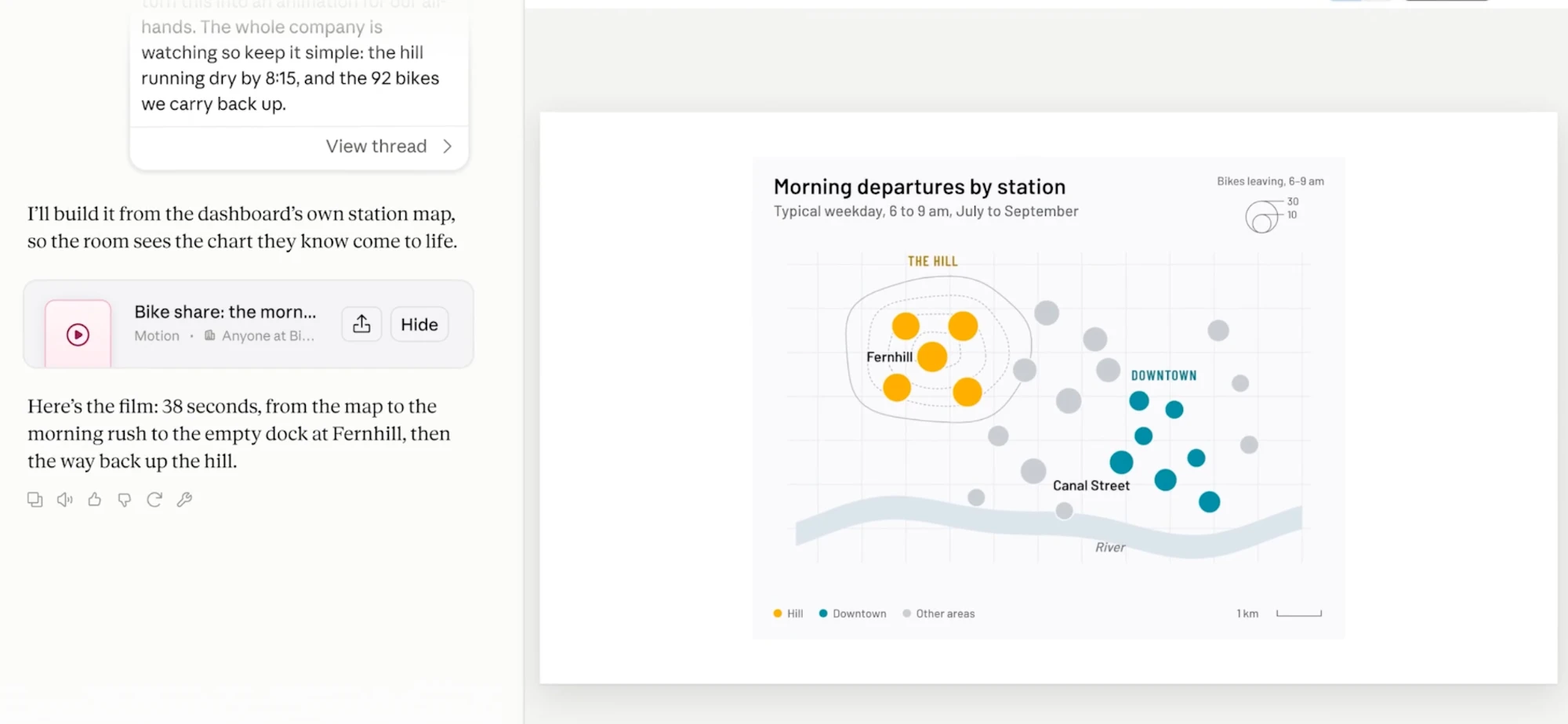
The image above is from the demo video. The user asks Claude to turn a bike-share dashboard into an animation for a company all-hands. Claude produces a 38-second Motion piece, using the station map from the original dashboard as its scene.
Claude Dashboards: ask your company’s data in plain language
Anthropic frames the problem this way: asking questions about company data usually means filing a ticket or writing SQL, so people wait, or skip it.
How Dashboards works:
- Connect a data source such as Amazon Redshift, BigQuery, ClickHouse, Databricks, or Snowflake. It works with your other connectors too, for example a dashboard of your Salesforce opportunities
- Ask in plain language. Claude writes the query, pulls the answer, and builds the dashboard
- The dashboard stays current as the data changes
What makes it checkable:
- Every chart shows the query behind it. Click any number to see its query, or ask Claude to explain it
- Every chart shows when its data was last refreshed
Anthropic says Dashboards work well for quick, exploratory questions, such as how this week’s signups compare with last month’s, and that they work alongside your BI and analytics tools. When a question needs deeper analysis, you can send the dashboard from Claude to Amplitude, Grafana, Hex, Mixpanel, Omni, Perplexity, PostHog, or Sigma. Looker, monday.com, and Tableau are coming soon.
Claude Motion: explain your work with animation
Examples Anthropic gives:
- Turn a quarterly report into a 30-second explainer for an all-hands
- Add motion to a chart in a board deck
- Make a product walkthrough for customer onboarding
Claude builds an animation from your prompt, and it plays like a short video. You can adjust it in the editor or ask Claude to change it, then download it as an MP4 file.
How it differs from typical AI video tools:
- Claude writes the animation as code that animates your text, charts, shapes, and images, so you can change any word, number, or timing
- It doesn’t use a video generation model, so there is no generated footage and no AI-generated people
- Anthropic says Motion is built for explaining your own work
To take a piece further, you can open it in Adobe, Descript, HeyGen, Higgsfield, invideo, Luma AI, or Runway. Canva and Captions are coming soon.
Docs, Slides, and Design are out of beta on every plan
Anthropic says that since it introduced Docs, Slides, and Design in every Claude conversation, people have made more than 45 million docs, decks, and designs in Claude. So the beta label is coming off, along with these additions:
- Edit with your team. Your team and Claude can work on the same doc, deck, design, or dashboard
- Share beyond your team. Share slides, designs, dashboards, and animations with people outside your organization, or with anyone who has the link, if your admin allows it
- Exports that keep your formatting. PowerPoint and PDF downloads look like what you made in the editor, and decks go straight to Google Slides as editable files
- Edit on your phone. Change a doc, deck, or design in the Claude mobile app
- Ready for enterprise. Artifacts now support CMEK, and admins choose which artifact templates their organization uses
If you are making docs, slides, or designs right now, the reduced-usage promotion we covered earlier still runs until October 15.
Claude Design is moving into Claude
Claude Design started at its own URL, claude.ai/design. Anthropic is now folding the standalone site into Claude, because running two versions slows down fixes for both.
The standalone site stays up until December 14. Three things to know if you use it:
- Design systems can be migrated today. On the Artifacts page in Claude, click “Migrate team design systems”. One migration brings over every design system in your organization, and the originals stay unchanged in the standalone version
- Your projects need nothing from you yet. They keep working in the standalone version until it closes
- Chats and comments will not come along. Chats with Claude and comments on your projects stay in the standalone version and will not be available after it closes. Public links to standalone projects stop working then too. Save anything important before that date
Getting started
Open Claude and ask for what you need. Example prompts from the announcement:
- “Build a dashboard of this quarter’s revenue by region”
- “Animate how our pricing plans compare for the sales kickoff”
- “Turn these notes into a deck for Monday”
For Enterprise admins: Dashboards and Motion are off by default. Turn them on in Organization settings > Artifacts. Docs, Slides, and Design turn on by default on October 15, or you can turn them on today.
The author’s take
For most members of our group, the news you can use right away is Docs, Slides, and Design, which now work even on the Free plan. If you have never asked Claude to make a deck or a document, there is no plan barrier any more.
On Motion, I like the decision not to use a video generation model. Presenting a company’s numbers needs accuracy more than spectacle, and an animation that is code, where every number can be edited, suits that better than AI-drawn video. The limit for now is that it is only on Team and Enterprise, so people on Pro or Max have to wait.
Dashboards look useful for teams whose data sits in a warehouse but who have nobody writing SQL full time. The habit I would recommend is to open the query behind any important number before you act on it, since Anthropic makes that available on every chart.
If you try Dashboards or Motion, share what you made with the group.
The information in this article is based on Anthropic’s official announcement at claude.com and posts from the Claude account on X. Read the original source in the link below.
Get it by email
New articles, Claude updates and community event announcements. Sent occasionally, never often enough to annoy you.
The newsletter is written in Thai