
Claude on web and desktop now streams long replies about 4x smoother after a renderer rewrite
Anthropic rebuilt the streaming renderer for Claude on web and desktop to only touch what changes on screen instead of redrawing everything. Long replies now stall 9x less and hold frame rate far better.
By Nattapon YongpaiboonCo-founder, Claude Thailand Community
What’s changing
Lydia Hallie, an engineer at Anthropic, posted on X (Twitter) that the team rebuilt the streaming renderer Claude uses on web and desktop. The result: long replies now stream roughly 4x smoother.
Her post states it plainly: “We rebuilt the streaming renderer to only touch what’s still changing, so a long reply stalls 9x less on a slower laptop, its worst freeze is 4.5x shorter, and on a 120Hz MacBook it holds 120fps start to finish.”
What was causing the problem
A lot of people have likely run into Claude stuttering or freezing in short bursts during a long reply. The cause was that the old renderer redrew the entire screen every time a new chunk of streamed text arrived. The longer the reply, the more redraws piled up. The rebuilt renderer fixes this at the source: it now updates only the part of the screen where the text actually changed.
Our own side-by-side test
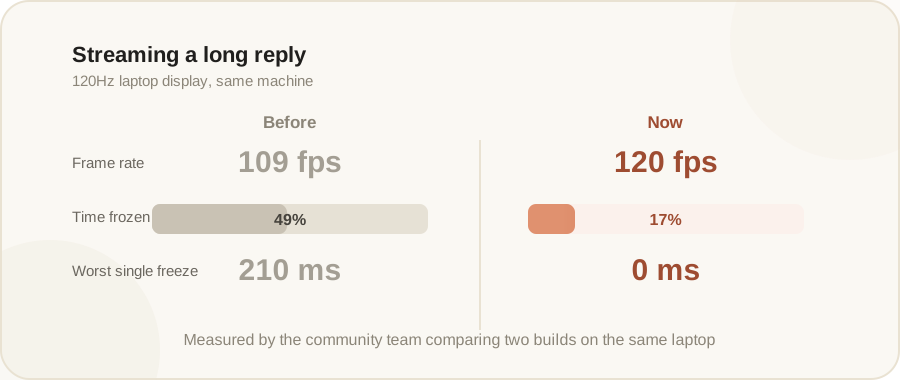
The team behind this site ran its own comparison on the same laptop, on a 120Hz display, between an older build (15 July) and the new one (24 August), while having Claude stream a long reply. Here’s what we measured:
- Average frame rate went from 109fps up to a full 120fps.
- Time spent frozen while streaming dropped from 49% down to 17%.
- The single worst freeze dropped from 210 milliseconds to 0 milliseconds, essentially no more heavy stalls at all.
Do you need to do anything
No. Regular users get the full benefit with nothing to update. Just use Claude through the web or desktop app as usual, the server side and the newly loaded renderer handle it automatically.
The writer’s take
I think the people who’ll notice this most are the ones who regularly ask Claude for long output, long code, long document summaries, since that’s exactly where the stalling used to be worst. Fixing this at the rendering layer, rather than just trimming what gets sent, feels like the more durable fix.
Details in this article come from a post by Anthropic engineer Lydia Hallie on X (Twitter), together with a side-by-side comparison this site’s team ran itself. Read the original post via the source link below.
Get it by email
New articles, Claude updates and community event announcements. Sent occasionally, never often enough to annoy you.
The newsletter is written in Thai