
Claude now uses one memory across chat and Cowork, and you decide what goes in it
Anthropic has unified Claude memory so chat and Cowork share the same store. You can read, edit or delete each topic in Settings, and sensitive subjects stay out by default.
By Nattapon YongpaiboonCo-founder, Claude Thailand Community
What’s changing
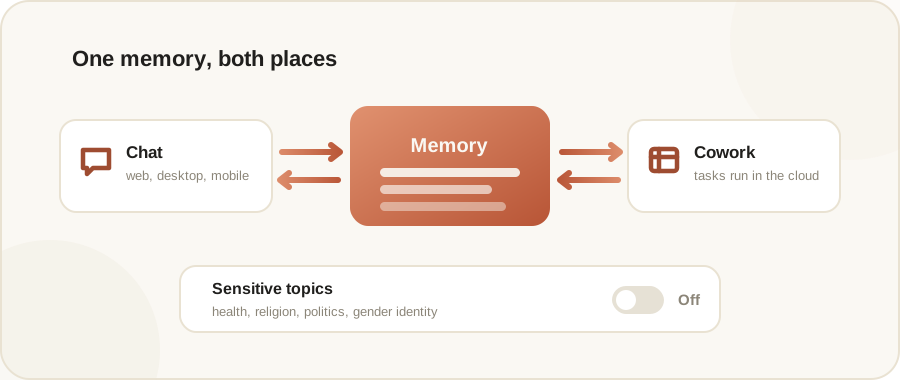
Anthropic announced on 25 August 2026 that the memory Claude uses in chat and the memory it uses in Claude Cowork are now the same store. The announcement opens with: “Starting today, the memory you use in chat is the same as in Claude Cowork. Now, wherever you work with Claude, it starts from what it already knows about you.”
In practice: when Cowork runs a task in the cloud, what Claude remembers from your chats is there, and vice versa. A project you explained once, your manager’s preferences, a client you already discussed, none of it needs repeating.
The controls matter more than the feature
See and edit it topic by topic. Everything Claude remembers appears as a list of files under Topics in Settings > Memory, where you can read, edit, or delete each one.
It saves while you chat, not after. Claude now adds topics to memory as you chat, instead of summarising conversations after they end. Anthropic’s example: mention that a deadline moved, and your next conversation already knows.
You can tell it to remember. Claude saves on its own, and you can also tell Claude to “remember this” to save something directly.
Sensitive subjects are out by default. Claude does not store topics related to personal or sensitive subject matter, like your health, race, ethnicity, religious beliefs, politics, gender identity, and other similar areas. You have to opt in if you want those remembered.
Who gets it
- Free, Pro and Max: on by default, across web, Claude Desktop and mobile (update to the latest version of the app).
- Team and Enterprise: off by default. An owner or admin turns it on for the organisation.
One thing with a deadline
If you used the previous version of memory, you’ll see an option to export your legacy memory under Settings > Memory until 9 September 2026. After that the option goes away, so export it before then if you want to keep it.
About the Import button on the same screen
In Settings > Memory you’ll also see Import memory from other AI providers, which pulls context across from another AI tool. That isn’t new in this announcement, Anthropic shipped it back around March 2026. It just lives on the same settings screen, so it shows up alongside these changes.
The writer’s take
The part I like is that Anthropic drew a clear line between ordinary memory and sensitive memory, and left the second one to you rather than hoovering up everything from the start. If privacy is on your mind, go open Settings > Memory and actually read what it currently knows about you.
Details in this article come from Anthropic’s official announcement at claude.com/blog, published 25 August 2026, together with Anthropic’s Help Center documentation. Read the original post via the source link below.
Get it by email
New articles, Claude updates and community event announcements. Sent occasionally, never often enough to annoy you.
The newsletter is written in Thai