
Anthropic Launches claude.dev, a New Home for Developers Building with Claude
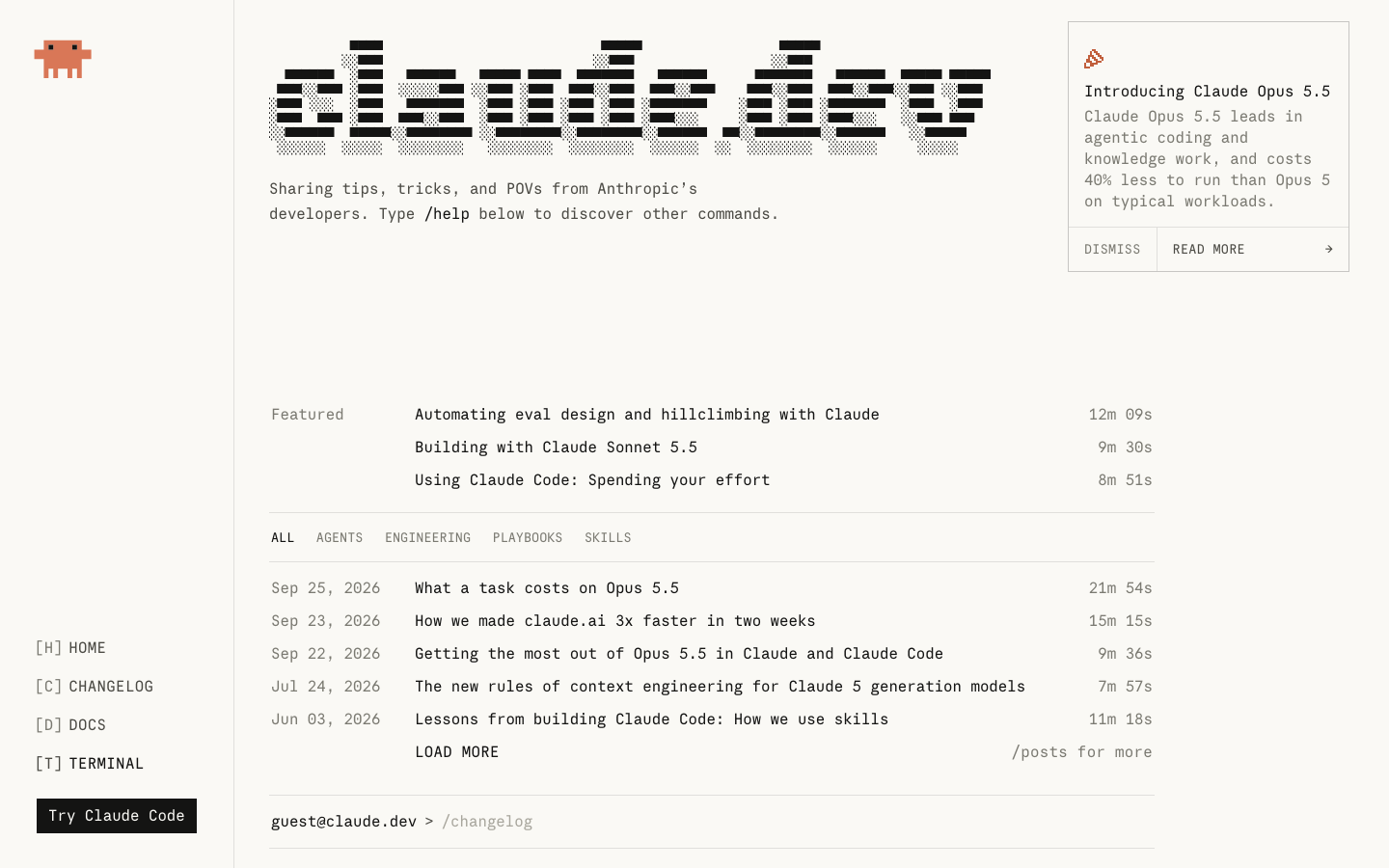
claude.dev is a new site from the Claude Devs team with engineering deep dives, Claude Code and API guides, and tips from the teams building Claude. It has four categories, real-world video case studies, and a Terminal mode for reading the blog by typing commands.
By Nattapon YongpaiboonCo-founder, Claude Thailand Community
Anthropic has launched claude.dev, a new home for developers building with Claude.
The Claude Devs team says the site will carry engineering deep dives, Claude Code and API guides, tips from the teams building Claude, and some easter eggs hidden for people to find. The site describes itself briefly as a place for sharing tips, tricks, and POVs from Anthropic’s developers.
How it differs from the docs
The docs tell you how each feature works. This site tells you how Anthropic’s own developers actually use them. Posts up right now include:
- “What a task costs on Opus 5.5”
- “How we made claude.ai 3x faster in two weeks”
- “Lessons from building Claude Code: How we use skills”
- “Building with Claude Sonnet 5.5” and “Getting the most out of Opus 5.5 in Claude and Claude Code”, for anyone who has just moved to the 5.5 model family
The posts visible on the home page run from May 2026 through late September, each labelled with a reading time, ranging from about 7 to 21 minutes. For background on those two models, see our coverage of Claude Opus 5.5 and Claude Sonnet 5.5.
What’s on the site
- Posts are split into four categories: Agents, Engineering, Playbooks, and Skills, which you can filter from the bar above the list.
- There are real-world videos too, such as the 22-minute “How the Claude Code team uses Claude Code”, case studies from Ramp and DoorDash, and “How founders build on Claude Managed Agents”.
- A Terminal mode lets you read the blog in a terminal-style interface. Type
/helpto see the commands, and there are others such as/postsfor more posts. - A Docs button takes you to the Claude Code docs.
- Keyboard shortcuts work: the menu labels them, such as H for Home, D for Docs, and T for Terminal.
All the content is in English, and judging by the topics, it suits people who already use Claude Code or the API.
Editor’s take
I like that this site has a clearly different job from the docs. Reading docs tells you what each button does, but not much about how the people who built it use it day to day. Posts like the one on what a task costs on Opus 5.5, or how claude.ai got 3x faster, are the kind of detail that’s hard to find elsewhere. The Terminal mode is a fun touch that fits the audience.
Go take a look, and if you find an easter egg, let the group know.
The information in this article is based on the claude.dev website and the Claude Devs team’s announcement on October 1, 2026. Visit the site in the link below.
Get it by email
New articles, Claude updates and community event announcements. Sent occasionally, never often enough to annoy you.
The newsletter is written in Thai