
Claude Code now drafts the bug report for you, and holds it until you say send
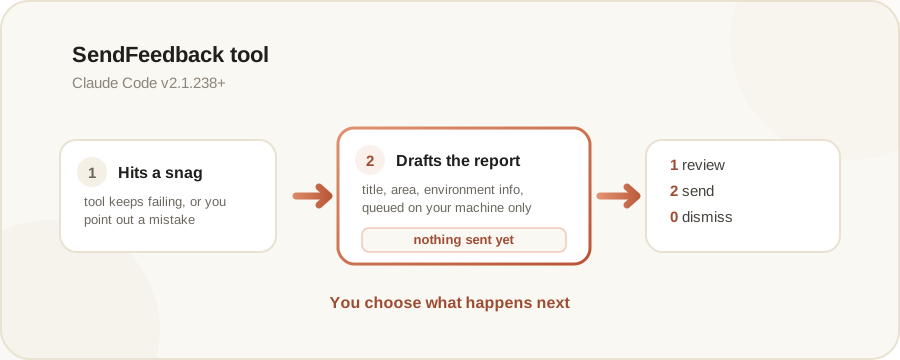
Claude Code adds a SendFeedback tool that automatically drafts a feedback report when it hits a bug or makes a mistake, queuing it locally and sending nothing until you approve it.
By Nattapon YongpaiboonCo-founder, Claude Thailand Community
What’s changing
ClaudeDevs, Anthropic’s official account for developers, announced that Claude Code has a new tool called SendFeedback, which automatically drafts a feedback report when it hits a bug while working, and sends nothing until you tell it to. Claude Code’s official documentation lists this as available from version 2.1.238 onward.
When Claude drafts one automatically
Per Claude Code’s documentation, Claude drafts a feedback report on its own when:
- A tool or command keeps failing
- It can’t help with something you asked for
- You point out a mistake it made, or it notices one
- You ask it to file feedback
Nothing sends until you say so
Once Claude queues a draft, a card appears above your prompt showing the draft’s title. Press 1 to read the full draft, press 2 twice to send it exactly as written, or press 0 to dismiss it.
When you do send it, the report carries your title, area, and details; environment info such as your Claude Code version, operating system, and model; and the IDs of recent API requests. The full conversation transcript is only included if you leave the “Send transcript” option set to yes on the review screen. Sending straight from the card (the quick double-2) never includes the transcript.
The documentation also notes that Claude Code keeps your working directory in the local draft only so it can locate the transcript, and does not send the directory itself.
Once sent, a report goes through the same channel and retention policy as the /feedback command.
The writer’s take
The part I like best is holding the draft locally instead of sending it straight away, because it gives you a chance to check what’s in it before anything actually goes out. There was a report earlier where a user asked Claude to draft a bug report for a public GitHub issue, and it included the organisation’s name, repo URLs, and private project details without stripping any of it out. Having a confirmation step every time at least gives you a moment to check before you actually hit send, instead of it going out automatically.
Details in this article come from the ClaudeDevs account on X (Twitter), together with Claude Code’s official Tools Reference documentation at code.claude.com/docs. Read the original post via the source link below.
Get it by email
New articles, Claude updates and community event announcements. Sent occasionally, never often enough to annoy you.
The newsletter is written in Thai