
Claude Code Publishes a Field Guide to Cloud Sessions: Run Tasks in Parallel, Even With Your Laptop Closed
The Claude Code team has published a field guide to cloud sessions on claude.dev. It explains running Claude Code on a fresh VM per task, seven workflows that suit it, how to connect GitHub on the first try, and a $100 to $250 bonus credit that can still be claimed until Oct 7 at 11:59pm PT.
By Nattapon YongpaiboonCo-founder, Claude Thailand Community
The Claude Code team has published a field guide to cloud sessions on claude.dev. A cloud session runs Claude Code on a fresh virtual machine for each task instead of on your laptop, so you can start several tasks at once and they keep going after you close your machine.
The guide is written by Addy Osmani and covers three things: how a cloud session differs from a local one, seven workflows that suit it, and how to connect GitHub on the first try.
Time-sensitive for Pro and Max subscribers: the one-time bonus credit for cloud sessions can still be claimed until October 7 at 11:59pm PT, which is Thursday 8 October at 13:59 Bangkok time. Details are in the cost section below.
How a cloud session differs from a local one
The guide starts from the observation that Claude Code in a terminal on your laptop depends on that laptop in three ways:
- It shares your working tree. Two sessions on one repository can edit the same files and fight over the same port.
- It runs with your credentials, so it can reach whatever your user account can.
- It stops when your computer sleeps or the Wi-Fi drops.
A cloud session removes all three. Each task gets a fresh VM with your repository cloned onto a new branch and the environment already set up. When the work is done, it sits on a branch you can turn into a pull request.
You can start a cloud session from claude.ai/code, the Claude mobile app, the Desktop app, your terminal, and Slack, then follow it from the browser, mobile, and Desktop.
| Local session | Cloud session | |
|---|---|---|
| Runs on | Your machine | A fresh VM for each task |
| Laptop asleep or offline | The session stops | The session keeps going |
| Several tasks on one repo | Separate worktrees and ports, managed by you | One VM and one branch per task |
| What the agent can reach | Anything your account can, including SSH keys and cloud CLIs | The repository, the network level you set, the connectors you enable, and a session-scoped GitHub credential |
| Approvals | Any mode, including per-command | Auto, Accept edits, or Plan |
| Ends with | Changes in your working tree | A branch, and a pull request when you want one |
| Compute | Your machine | No separate compute charge; uses your plan’s limits |
A real example: three tasks, three machines, done in 87 seconds
The author tested against a small sample repository called tidepool, a Node API with three ordinary problems: a test that failed about one run in four, API docs that no longer matched the code, and a logger that concatenated strings. He started three cloud sessions within 16 seconds of each other, one machine per problem.
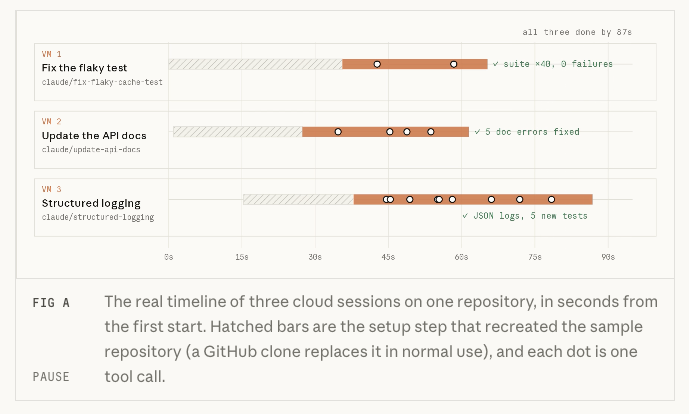
The three sessions ran for 61, 65, and 72 seconds, and all were done 87 seconds after the first one started.
- Flaky test: Claude found a race condition in the cache, fixed the root cause, and ran
npm test40 times in a row with zero failures. - Docs: Claude started the real server, ran a curl against every endpoint, and found five ways the old doc was wrong.
- Logger: Claude wrote a JSON logger with five tests, then found the cache test failing because of the same race the first session was fixing. It reported that in its summary and left the code outside its task alone.
That last result is the lesson of parallel work. Each session has its own copy of the repository, its own processes, and its own branch, so they cannot collide. They also cannot see each other’s work. The guide’s advice: split tasks along file boundaries, merge branches in a sensible order, and expect one session to report a problem another session is already fixing.
Four things under the hood that change how you work
- Every task gets its own machine. A fresh VM with your repository on a new branch, so sessions cannot touch each other’s files or ports. The VM has about 4 vCPUs, 16 GB of RAM, and 30 GB of disk.
- Your GitHub token never enters the VM. A proxy holds it, and the session gets a short-lived credential that can push only to its own branch.
- The repository’s Claude config comes along. Your personal one does not.
CLAUDE.md, rules, skills, agents, and commands in the repo are available. Your~/.claudestays on your laptop. - Idle VMs get reclaimed. Reopen the session and you get a fresh VM with the conversation restored, so commit work you care about.
Seven workflows that suit cloud sessions
- Clear a backlog in parallel. Five small, unrelated fixes become five sessions and five branches to review. From a terminal, each one is a single
claude --cloud "..."command. Write each task as a self-contained ticket: what is wrong, what done looks like, and which command proves it. - Let it prove the fix. The cloud machine is not your CPU, so ask for heavy proof, such as running the suite 200 times or bisecting a regression across 50 commits.
- Plan at your desk, build in the cloud, finish in your terminal. Agree on a plan in plan mode, commit it, have a cloud session execute it, then pull the session down with
claude --teleport. - Check in from your phone. The Code tab in the Claude app connects to the same sessions. Start a task, follow it, answer Claude’s questions, or tell it to watch a pull request.
- Hand CI failures and review comments to Claude. With Auto-fix on, Claude pushes clear fixes and asks you about anything ambiguous or architectural. This needs the Claude GitHub App.
- Start work without starting it yourself. Routines (research preview) run cloud sessions on a schedule, from an HTTP call, or from a GitHub event.
- Run code you don’t fully trust. A contributor’s pull request or a new dependency’s install script runs in a disposable VM, away from your SSH keys and browser profile, with a network you can narrow down to None.
When several tasks belong to one larger effort, Projects provide a coordinator conversation that starts and tracks the cloud sessions for you.
Connecting GitHub on the first try
The guide says that if your first cloud session goes wrong, GitHub is the most likely reason, because cloud sessions need two separate GitHub permissions:
- Signing in with GitHub tells Claude who you are. That alone is enough for public repositories.
- Installing the Claude GitHub App on an account or organization sets which private repositories Claude can see there.
If you connected GitHub and a private repository is missing, the App usually is not installed on the account or organization that owns it. For an organization, an owner usually has to approve the install.
There are three ways to connect:
- In the browser (recommended) at claude.ai/connect-github, then install the App.
- From your terminal with
/web-setupin Claude Code, which sends yourghCLI token to your Claude account. Auto-fix, GitHub triggers, and Projects still need the App. - Skip GitHub for a one-off. Run
claude --cloudin a repository with no GitHub remote and Claude Code uploads a bundle of the repository instead.
Organizations that use SAML single sign-on need to click Authorize for each organization during the GitHub connection step, or that organization’s repositories will not appear.
When to stay local
Cloud sessions do not replace local ones, and most people use both. Stay local when the task needs something only your machine has:
- A database with real local data, or a service you reach over VPN
- A GPU, a phone simulator, or hardware on your desk
- Tight visual loops where you want to see each change in your own browser within seconds
- An organization that runs with Zero Data Retention, which turns cloud sessions off
Two options sit in between. Remote control keeps the session on your machine and lets you steer it from your phone. Self-hosted environments (beta for Team and Enterprise) run cloud sessions on your organization’s own infrastructure, so they can reach private networks.
Cost and the bonus credit
Cloud sessions come with Pro, Max, Team, and Enterprise plans at no additional cost. There is no separate charge for the cloud machine, and sessions draw on the same usage limits as the rest of Claude Code. Depending on the plan, an organization owner may need to turn them on first. They are not available with a Console API key or a third-party provider.
The thing to watch: parallel sessions draw on your plan limits in parallel, so five sessions use them about five times as fast as one.
One-time bonus credit for cloud sessions
- Who is eligible: individual subscribers who were on a Pro or Max plan on September 23
- How much: $100 on Pro and $250 on Max, on top of plan limits
- How to claim: run
/claim-creditin Claude Code, or go to claude.ai/code/claim-credit - Deadline: October 7 at 11:59pm PT, which is Thursday 8 October at 13:59 Bangkok time
- Expiry: November 4. Cloud sessions use this credit first, then count toward your plan limits once it runs out or expires
- Limits: not eligible for Projects or Routines
Habits that pay off
- One task, one session. Small, separate sessions are easier to review and cheaper to throw away.
- Ask for evidence. Name the command that proves the task is done, and read Claude’s summary before the diff.
- Push before
claude --cloud. The VM clones from GitHub, so unpushed commits do not reach it. - Commit as you go on long tasks. Idle VMs can be reclaimed.
- Put key commands in
CLAUDE.md, such as how to run the integration tests, because your personal config does not reach the VM. - Let sessions check their own work. Set up the environment and setup script so tests can run. Otherwise you review changes nobody has run.
Start in five minutes
- Open claude.ai/code, or run
/loginin Claude Code with your claude.ai account. - Connect GitHub and install the Claude GitHub App where your repository lives.
- Pick the repository and the Default environment.
- Give Claude one task from your backlog, with a command that proves it is done.
- Close the tab. Check in from your phone later, then review the diff and create the pull request at claude.ai/code.
The author’s take
For me, the real change is not speed. It is that the work no longer depends on my machine. I can hand off a task, close the laptop for a meeting, and come back to a branch that is ready for review. Because each task lives on its own machine, I am comfortable starting several at once without worrying about them overwriting each other’s files.
Two things to watch. First, limits: five parallel sessions use your plan about five times as fast. Second, the quality of the prompt. A task sent to the cloud has to be self-contained and say clearly how to prove the result, because you are not watching it step by step the way you would locally.
If you were on a Pro or Max plan on September 23, remember to run /claim-credit before the deadline. And if you try cloud sessions and find a workflow that works well, share it with the group.
The information in this article is based on the Claude Code in the cloud field guide on claude.dev and posts from the ClaudeDevs account on X. The Bangkok time for the credit deadline is converted from the announced PT time. Read the original source in the link below.
Get it by email
New articles, Claude updates and community event announcements. Sent occasionally, never often enough to annoy you.
The newsletter is written in Thai