
Claude Code Now Lets You Build Mods to Change How It Behaves and Looks, in TypeScript
Claude Code has introduced mods: small TypeScript functions that change how Claude Code works. They can rewrite prompts, add UI, and replace built-in features. Write one yourself or have Claude write it, install with /plugin, in the CLI and desktop app.
By Nattapon YongpaiboonCo-founder, Claude Thailand Community
You can now mod Claude Code. A mod is a small TypeScript function that changes how Claude Code works in three ways: it can change how it behaves, customize the UI, and swap built-in features for your own.
You can write one in a few lines of TypeScript, or ask Claude Code to write it for you. Mods ship inside plugins, so you install and share them like any plugin with the /plugin command, and they work in both the Claude Code CLI and the desktop app.
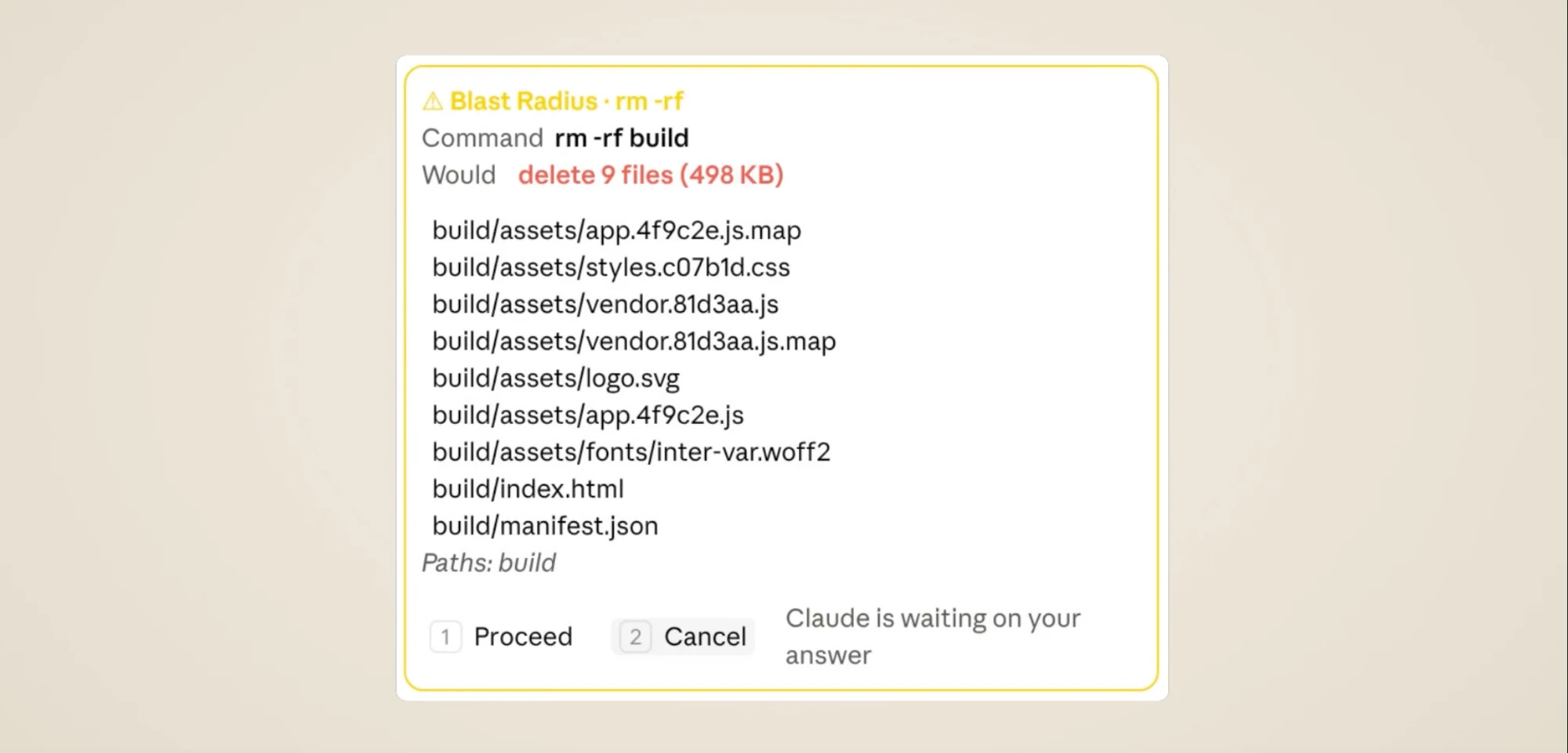
The image above is Blast Radius, one of Anthropic’s example mods. When Claude is about to run a risky command like rm -rf, it holds the call and opens a box listing what the command would delete. Press 1 to run it, or 2 to cancel.
Why mods exist
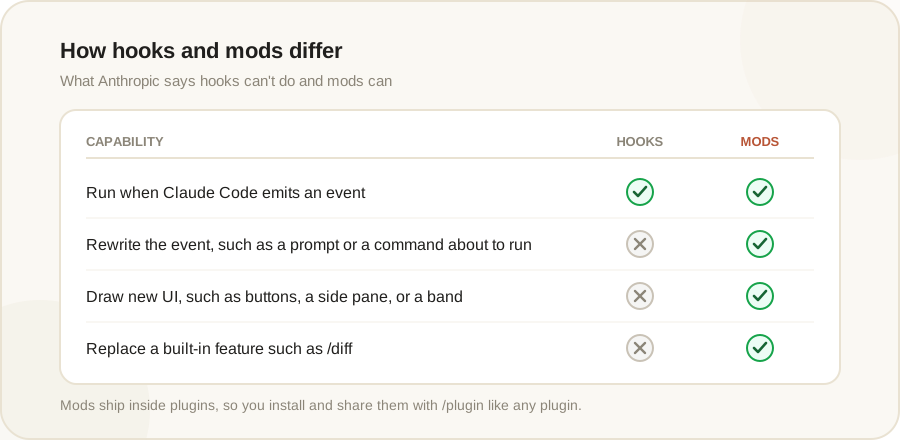
Anthropic says developers have asked for more control over how Claude Code works without waiting for the team to ship a feature. Hooks gave some of that control, but hooks can’t rewrite events, draw new UI, or replace features. Mods can.
How mods work
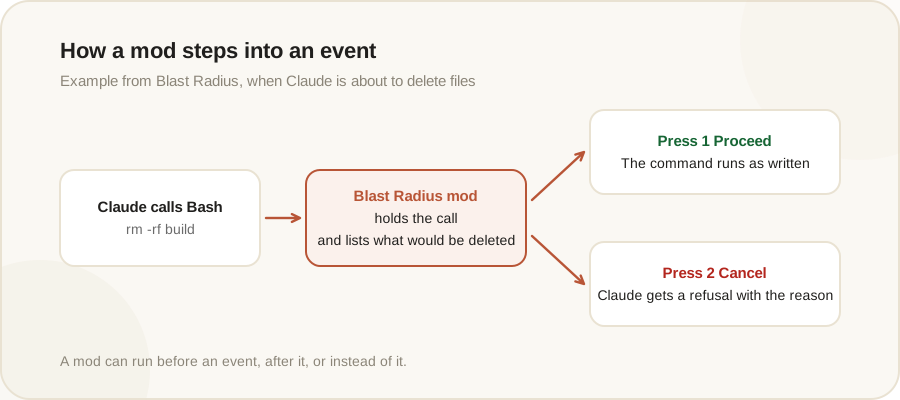
Each time Claude Code does something, such as calling a tool, asking for permission, or drawing part of the screen, it emits an event. A mod is a function that hooks into one of these events, and it can run before the event, after it, or instead of it. With one function, a mod can:
- Rewrite a prompt before it reaches the model
- Block, rewrite, or retry a tool call
- Approve or deny a permission request
- Redact secrets from tool output before Claude reads it
A mod can also change what you see, editing or replacing part of the interface Claude Code draws and adding buttons and inputs. When several mods hook the same event, they run in the order they load, so you can stack mods from different authors.
Some built-in features are now mods
Some of Claude Code’s own features now ship as mods. The built-in /diff is one, so you can turn it off in /plugin or replace it with your own version. Anthropic plans to move more built-in features to mods over time, so you can pare Claude Code down to a small core and add back only what you want. The source for the team’s own mods is public in the anthropics/claude-code repository on GitHub.
Three example mods in the guide
The getting started guide on claude.dev builds a first mod from an empty folder, then tours two larger ones.
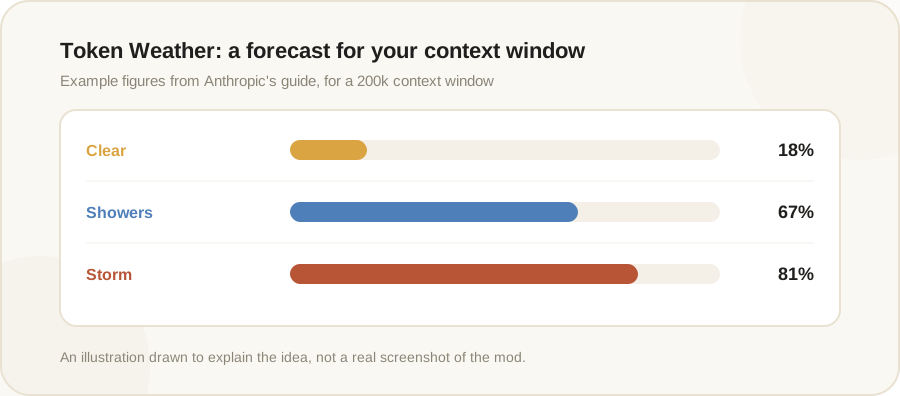
- Token Weather draws a “forecast” of the context window above the prompt, moving from clear skies to showers to a storm as the context fills. It’s about 80 lines.
- Blast Radius holds risky commands such as
rm -rf,git reset --hard, a force push, or a database migration, and shows what they would touch, with Proceed and Cancel buttons. - Replay Theater records every file edit during a turn, then lets you step through the diffs one at a time when the turn ends.
The guide also notes you don’t need to know the API to make a mod. Describe what you want to see, and Claude Code writes the TypeScript, installs it, and hot reloads it in your session, so you can keep asking for tweaks without restarting.
Things to be careful about
- Mods aren’t sandboxed. They run with the same access to your machine as Claude Code itself, and they’re written by their publisher, not Anthropic. Only install mods from sources you trust, the same way you’d install any code on your computer, and read the repo first.
- Blast Radius is a safety net, not a permission system. It reads the command text, so commands hidden in aliases or scripts get past it. Use permission rules for a hard block.
- The API can change between releases.
For teams and enterprises
Because mods ship inside plugins, your existing plugin controls apply, and admins can allow or block plugin marketplaces. On Team and Enterprise plans, a built-in mod called sec-default loads first and stops mods that users install from doing risky things, like overriding your permission deny rules.
Teams can also use mods to build their own controls, such as showing CI/CD status in a pane beside the conversation, requiring confirmation before any command touches production config, or logging every call other mods make.
Getting started
Mods are available today in the Claude Code CLI and desktop app. You need Claude Code 2.1.287 or later, and mods are on by default with nothing to turn on. Install plugins that include mods from the Claude directory or by running /plugin in the CLI. To share a mod, package it in a plugin and submit it to the directory.
Editor’s take
This is a bigger shift than the name suggests. Until now you could adjust Claude Code only through the openings Anthropic provided. Now you can change the behavior and the screen yourself. Anthropic moving its own features like /diff onto mods shows it means this to be the core of the product. The thing to watch is security: a mod has the same access to your machine as Claude Code, so installing a mod from a stranger carries the same risk as running a stranger’s code.
If you’ve built a mod, or have an idea for something you wish Claude Code could do, share it with the group.
The information in this article is based on Anthropic’s official announcement at claude.com/blog and the getting started guide on claude.dev. Read the original source in the link below.
Get it by email
New articles, Claude updates and community event announcements. Sent occasionally, never often enough to annoy you.
The newsletter is written in Thai