
Claude Code on Desktop Now Tests Apps on iPhone Duo in the iOS Simulator, Folding the Device to Check Every Pose
Claude Code on desktop now supports iPhone Duo in the iOS Simulator, in public beta. Run your app on Duo next to your conversation, and Claude can fold and unfold the device to test the layout closed, half open, and open. It needs macOS and Xcode 27.1 or later.
By Nattapon YongpaiboonCo-founder, Claude Thailand Community
Claude Code on desktop now supports iPhone Duo in the iOS Simulator, in public beta.
You can run your app on iPhone Duo next to your conversation, and Claude can fold and unfold the device to test each layout.
An example
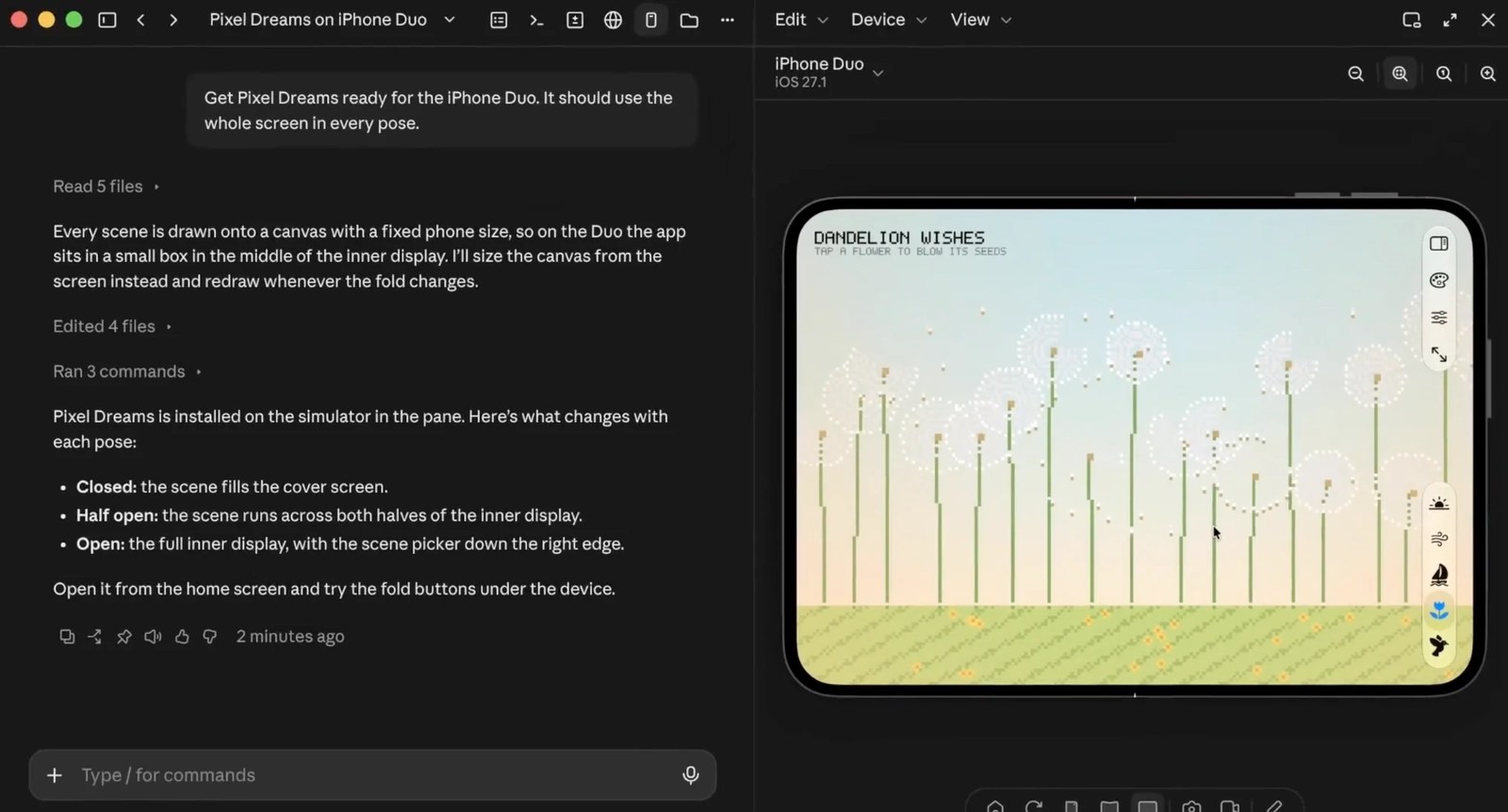
In this frame from Anthropic’s video, the user asks Claude to get the Pixel Dreams game ready for iPhone Duo and use the whole screen in every pose. Claude reads the code and finds that every scene is drawn on a canvas with a fixed phone size, so on the Duo the app sits in a small box in the middle of the screen. Claude sizes the canvas from the screen and redraws it whenever the fold changes. The result:
- Closed: the scene fills the cover screen
- Half open: the scene runs across both halves of the inner display
- Open: the full inner display, with the scene picker down the right edge
Two ways to fold the device
According to the Claude Code documentation:
- Fold it yourself: click one of the three pose buttons next to the rotate button, Closed, Half open, or Open, or drag the slider for an angle in between
- Ask Claude to fold it: name a pose, or ask for a half-open hinge angle from 1 to 179 degrees
For example, “Run the app on the iPhone Duo simulator and check the settings screen closed, half open, and open.” has Claude run the app and check the settings screen in all three poses.
Get an existing app ready for iPhone Duo
If you’re adapting an existing app, ask Claude to get it ready for iPhone Duo. Claude Code can offer to install Apple’s App Resizability skill, which scans your project for layout issues and suggests fixes. Claude makes the ones you approve and checks them on the Duo simulator.
The skill ships with Xcode as one of its skills for coding agents. Before a layout check on the Duo, Claude may ask whether to export Xcode’s skills to your personal skills folder. If you agree, Claude Code loads them in your other projects too.
What you need
- A Mac, since Apple’s iOS Simulator runs only on macOS
- Claude Desktop v4.29.0 or later. Update from Claude > Check for Updates…
- Xcode 27.1 or later with the iOS 27.1 simulator runtime, which includes the iPhone Duo
- A plan: Pro, Max, Ultra, Team, or Enterprise, except Enterprise organizations with a HIPAA configuration and users on a third-party provider
The iOS Simulator pane works in local sessions only, and Claude drives simulated devices only, not a physical iPhone or iPad.
If the device menu doesn’t list an iPhone Duo yet, select Add simulator… at the end of the list and choose an iPhone Duo device type.
Get it by email
New articles, Claude updates and community event announcements. Sent occasionally, never often enough to annoy you.
The newsletter is written in Thai