
Claude API Launches Message Threads, Sending Only New Messages Each Turn, and Claude Code Starts Responding About 35% Sooner in Long Conversations
Message threads are now in public beta on the Claude Messages API. The API holds your conversation on the server between turns, so you send only the new messages and the ID of the previous response. In Claude Code, median time to first token is about 35% lower on requests with 500K to 1M tokens. Pricing and rate limits stay the same.
By Nattapon YongpaiboonCo-founder, Claude Thailand Community
Anthropic has released message threads on the Messages API as a public beta.
Normally, every request to Claude through the API resends the full conversation, including earlier messages, tool results, and attached images. Once a conversation reaches hundreds of thousands of tokens, that resending delays the moment Claude starts responding.
Message threads fix this. The API keeps your conversation on the server between turns, so each later turn sends only the new messages and the ID of the previous response, and Claude starts responding sooner.
Claude Code starts responding about 35% sooner
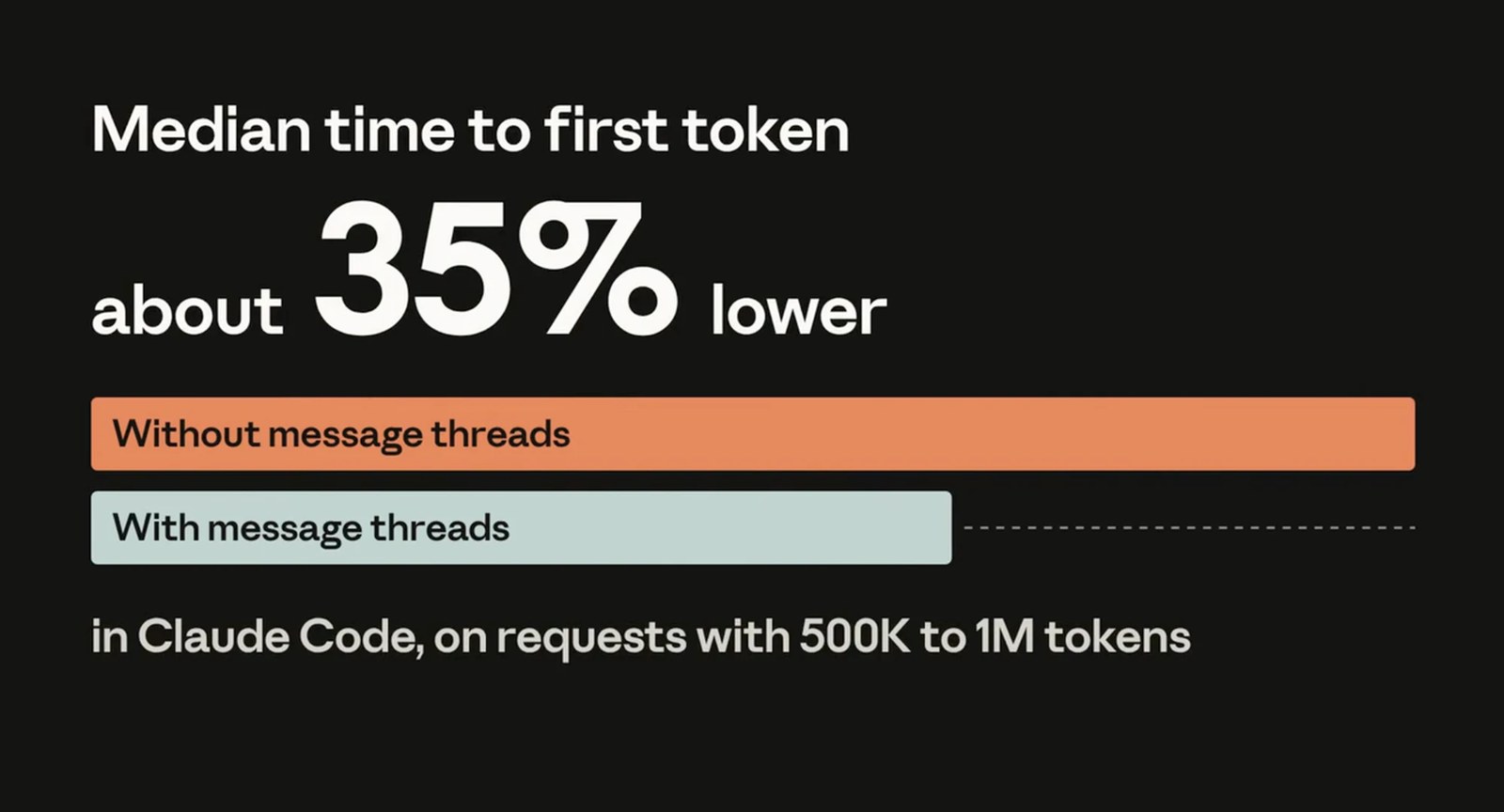
Anthropic has already integrated message threads into Claude Code, where they are on by default for most users.
- On requests with 500K to 1M tokens, median time to first token is about 35% lower
- In long conversations, the median request size went from about 800 KB to 1.8 KB
Same tokens, same price
Message threads do not change pricing or rate limits. Requests get smaller, but Claude still reads the full conversation on every turn, so you are billed for the same number of tokens.
This feature is about how fast Claude starts responding, not about cost. To cut cost as well, use prompt caching alongside it (see below).
How to use it
According to the message threads documentation, send the message-threads-2026-08-12 beta header on every request and add a thread parameter.
- First turn (create): send the full conversation with
systemandtoolsas usual, and add"thread": {"type": "create"} - Later turns (continue): send only the new messages and the ID of the latest response. Leave out
systemandtools, because the thread keeps them
"thread": {"type": "continue", "previous_message_id": "<ID of the latest response>"}The SDKs include a helper, client.beta.messages.thread(...), that creates and continues the thread for you, adds the beta header, and keeps the full conversation in memory. You then call thread.send(...) once per turn.
Things to know before you use it
- Threads are short-lived. A thread expires 5 minutes after its last request. If the API can’t continue it, you get a 404
thread_not_founderror, and you send the full conversation again in a new create request - Your app stays the source of truth. Anthropic recommends keeping your own copy of every message and building the replay path from the start
- Append-only. Each response ID can be continued only once. To edit or branch an earlier message, start a new thread
- Some fields are fixed. Fields such as
model,tool_choice, andthinkingmust keep the same value on every request, or you get a 400thread_fingerprint_mismatcherror - Threads don’t cache for you. Prompt caching works separately. Send a top-level
cache_controlon every request to cache each turn. A request withthreadcan carry at most 4 cache breakpoints - Streaming works, but wait for the
message_stopevent before you continue the thread
Not supported yet
- Message Batches and token counting
- Compaction and context editing (except
clear_thinking_20251015withkeep: "all") - Organizations with HIPAA readiness or Inference hooks turned on
- Zero Data Retention (ZDR): message threads are not ZDR eligible, because the conversation is held for a short time. Anthropic says it is kept in memory, encrypted, never written to disk, and deleted no more than 1 hour after its last use
Where it’s available
- Claude API (Claude Platform)
- Claude Platform on AWS
- Claude Models on Google Cloud (Anthropic managed)
- Claude in Microsoft Foundry
It works with every current model from the 4.5 generation onward, including Claude Opus 5.5, Sonnet 5.5, Haiku 5.5, and Fable 5.1.
Who benefits
- Long-running coding agents, where every tool result or file edit makes the conversation longer
- Computer use agents, where screenshots stay in the thread instead of being uploaded again each turn
- Document- and image-heavy work. See also the Claude API’s 128 MB request limit
Message threads are separate from session threads in Claude Managed Agents.
Get it by email
New articles, Claude updates and community event announcements. Sent occasionally, never often enough to annoy you.
The newsletter is written in Thai